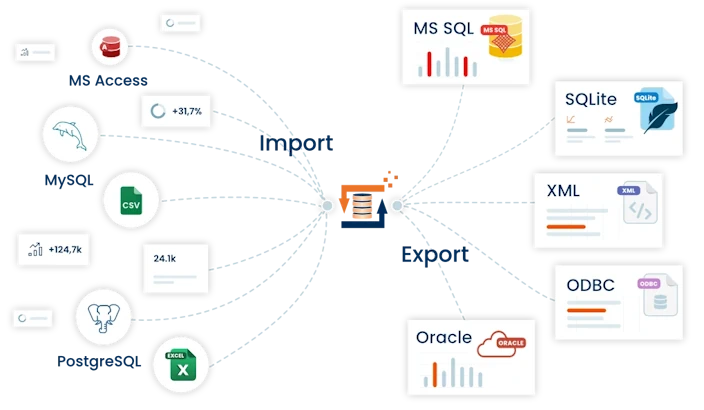
✅ Easy data integration - import/export
✅ No programming required thanks to visual modeling
✅ Simple ETL tool with versatile options
Data integration and data processing – no programming knowledge required
Convert, integrate, and process data between systems and formats. FlowHeater is an ETL tool for IT teams, data engineers, and business analysts who want to reliably implement their data integration and transparently model data processing—using Visual Designer instead of code.
FlowHeater: the ETL tool for flexible data integration
FlowHeater is a software solution for data integration and data processing (ETL) that allows you to merge, transform, and securely forward data from different sources - from one-time import/export to automated operation. Instead of complex in-house development, you can rely on a graphical ETL workflow that remains easy to understand in practice: connect sources, define mapping, apply transformations, and write results to target systems.
For IT teams, this means less manual effort, fewer errors during conversion, and a solution that can be clearly documented and reused.
Typical tasks that you can cover with FlowHeater:
- Data integration: connect sources, map fields, write data to target systems
- Data processing: transform, check, clean up, enrich – reproducibly and comprehensibly
- Automation: execute recurring jobs on a time- or event-driven basis (optionally with servers/batches)
Data sources and formats supported
Flexible adapters for files, databases, and interfaces are available for data integration. These enable you to process CSV/text, Excel, XML, and JSON files, as well as numerous database systems and REST APIs, and consistently transfer your data to the desired target system.
Data integration via mapping and drag & drop
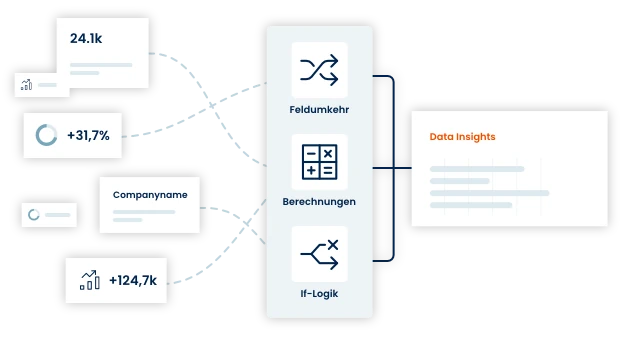
With FlowHeater, you can bring data from different sources together in a simple process: select the source, define the target, assign fields – and control the rest using drag & drop. This ensures that data integration remains traceable even when it becomes more complex.
- Assign fields and adjust data structures
- Apply calculations and rules (e.g., formats, values, conditions)
- Check and clean up data to improve data quality
- Write results to the target system in a uniform manner
Transform data according to your needs
For effective data processing, it is not enough to simply copy data from A to B. With FlowHeater, you can prepare data so that it is clean, consistent, and immediately usable - e.g., for reporting/BI, data warehousing, or migrations.
- Clean up, standardize, and supplement data as needed
- Merge, split, filter, or group data
- Reliably process formats and character sets (e.g., CSV, Excel, XML, JSON)
- Save processing steps as reusable workflows and execute them again
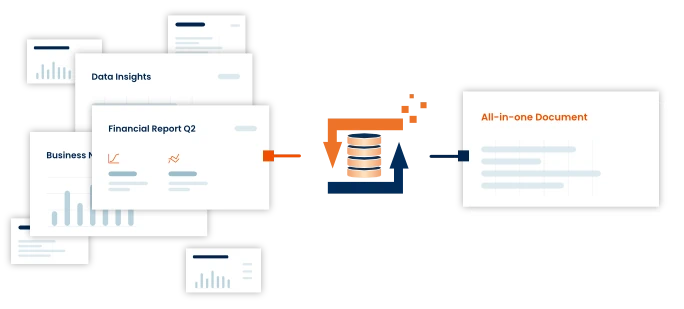
Automate your data processing
When data flows need to run regularly, automation becomes a productivity lever. With optional batch/server functions, you can execute data processing and data integration in a predictable and reliable manner—either time-controlled or event-triggered (e.g., when new files appear in the directory).
the perfect solution for a seamless transfer of your data.
FAQ - What is FlowHeater?
What is FlowHeater?
FlowHeater is an ETL tool for data integration and data processing that allows you to merge and transform data from various sources and write it to target systems—without any programming knowledge.
Who is FlowHeater suitable for?
FlowHeater is aimed at IT teams, data engineers, and business analysts who want to efficiently set up, document, and automate data flows between systems.
Which data sources and formats are supported?
FlowHeater offers adapters for files, databases, and interfaces, including CSV/text, Excel, XML, JSON, as well as common database systems and REST APIs.
Can I use FlowHeater without programming knowledge?
Yes, data integration and processing are performed using a graphical designer with mapping and drag & drop, so no scripts or SQL knowledge are required.
Is FlowHeater suitable for recurring and automated ETL jobs?
Yes, with the optional server and batch functions, ETL workflows can be executed automatically on a time- or event-driven basis.
For which scenarios is FlowHeater typically used?
Typical use cases include data migrations, the creation of data warehouse and reporting paths, and regular import/export between specialist applications and databases.
Want to stay informed of new developments?
-
Receive product information
-
Tips and tricks
-
Never miss our discounts and promotions
Eine E-Mail mit einem Aktivierungslink wurde an Ihre E-Mail-Adresse geschickt!