 The Heater String Split allows to be split strings into multiple (sub)strings based on defined delimiters. The Heater supports the use of multiple delimiters.
Settings
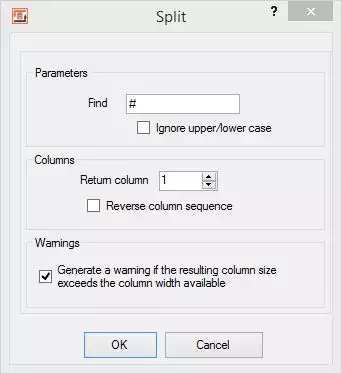 Heater Split, separate stringsSearch for: Here, enter the character or string you want to search for, which will be used to split the incoming string. Multiple delimiters are supported. Each line defines a separate delimiter. You can specify as many delimiters (lines) as you like.
Ignore upper/lower case: The “Ignore upper/lower case” option lets you control how the search for the specified string is performed in the input string.
Remove empty entries: If you enable this option, any empty values will be removed and will not be included in the column index.
Return column: which substring should the Heater return?
Reverse column sequence: With this option the substring results are numbered in reverse order. When you activate this option and set the return column to 1, instead of the first you obtain the last substring. With the return column set to 2 you get the substring before last, and so on.Warning: This setting controls whether a warning should be given when the returned column is wider than the current column width available.
Example
Let us assume a string with the following content
123#45#6#789#and so on
For the depicted default setting of column one, the Split Heater would return the sequence 123 from the above example. However, if we had set the return column to 4 the Heater would return 789 , and setting it to 5 would return and so on.
FlowHeater Parameters and system environment variables
The String Split Heater supports FlowHeater Parameters and environment variables as input. Parameter names must be enclosed in dollar signs e.g. $NAME$ Environment variables must be enclosed in percent signs e.g. %NAME% Any Parameter or environment variable so entered is replaced by its current value at run time.
Please also refer to the general information on the use of Heaters (functions)
String Split Heater Example Video