
 The Path Heater allows you to flexibly compose paths and filenames and/or extract specific components of a path specification. The Heater will assemble a complete path and filename when given several inputs, following the sequence in which they are supplied. These individual components of the path are joined with the backslash character “\” as a separator.
Note: When joining paths to combine several inputs, any existing backslash characters that would be duplicated by the insertion of extra separators are automatically eliminated.
Settings
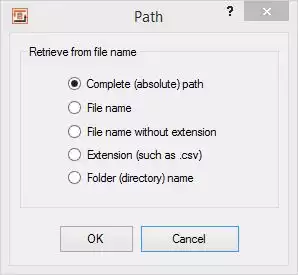 Path Heater - configurationSpecific parts of the path specification that are passed or composed can subsequently be extracted. These are:
Complete (absolute) path: The absolute device and path is returned.
File name: Extracts the file name part of the path specification, complete with extension.
File name without extension: Extracts the file name part of the path specification, without extension.
Extension (such as .csv): Returns the file name extension (file type) including the dot prefix, e.g.“.csv”
Folder (directory) name: Delivers the underlying folder name.
Please also refer to the general information on the use of Heaters (functions)